Today’s goal:
- Create webpage with Skeleton, a CSS template that can be used to make websites responsive
Today’s featured website:
- http://flagstories.co/– Flag design is more than meets the eye
Getting started with Skeleton
- About- review
- Questions- review
- Why is a grid design helpful for making a website responsive?
- What is important about the number 12?
- What is an external style sheet?
- What are the media queries based upon?
- Activities
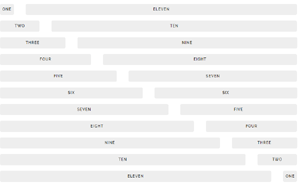
- Look at your 12 column wire frame that includes a header and footer that span all 12 columns, 3 content areas that span 4 columns, and 2 content areas that span 6 columns. We are going to code this using Skeleton.
- I’ve downloaded Skeleton for you and left it in a folder on your desktop called Skeleton CSS.
- Let’s look at the files in the folder. What is normalize.css and why would you use it? What else is in there?
- Let’s open Notepad++ and start a new page by opening up the index.html file. Rename this as skeleton_practice.html. Let’s check out the code here.
- Let’s open up the style sheet in Notepad++ and check it out.
- Let’s begin laying out our page according to our sketch.
- Let’s add some photos and use Skeleton’s utility classes, u-max-full-width, to make them responsive. We are going to use this big one and this small one.
- Let’s make a change on our external style sheet to see how it changes our webpage. Let’s add some background colors and borders to our four and six column areas.