Today’s goals:
- Quick review- what we learned from “How do you do that?”
- Continue talking about mobile design (from Monday)
Today’s featured website:
- https://ybogdanov.github.io/history-timeline/– This site could help you study for your next history exam!
How do you do that?
- Everyone found an example of something cool, unique, or puzzling from a website. As a group, we explored how to create these features.
- Here’s what we learned in our first round:
- The CSS cursor property can change a cursor into any image you want.
- Parallax, a cool scrolling effect that’s currently popular in web design, is used on sites like pixlr.com to provide a sense of depth and movement.
- You can add a search function to your website for free by using Google’s custom search engine
- BuiltWith.com is great tool to use to see what technologies and tools are used on a site you like or are curious about. We used that site to peek at NBA.com, which give us some insight into how such a complex site is managed.
- Finally, we discovered that JavaScript is often used to make sites interactive, including popular game sites like Poptropica. We also saw how the use of the HTML canvas tag with JavaScript on Android.com’s device history page makes the marshmallows “draggable.”
Mobile design
- Questions to explore in pairs with your table-mate:
- What is mobile design?
- Why is it important?
- Make a list of as many devices as you can that would access a website (types of devices and names, like MacBook Pro or Windows Phone).
- What is responsive design?
- Is www.medfordpublicschools.org responsive? How about www.medfordma.org?
- What are some ways (i.e. tools, methods or frameworks) to make a website “mobile-friendly” (i.e. be responsive or look good on a variety of different screen sizes)?
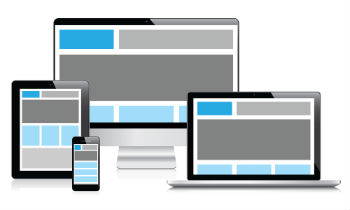
- What does responsive design look like?
- Let’s check out some examples here, here, and here
- Quick test for responsiveness of site- let’s check some (school site, city site, popular ones you like). Let’s also try this.
- What happens when you adjust the screen size?
- What do some of these sites look like on a phone? On a tablet? What differences do you notice?
Teams: tablet vs phone vs laptop
- Working in teams, you will do the following with whatever device you have (iPad, phone, or laptop). Take note of what you have to do for each task.
- Take a photo of something
- Email the photo to me (agoldsberry@medford.k12.ma.us)
- Go to the city website and find out what 2 meetings took place last night
- Go to the school website and see what’s for lunch tomorrow
- Find out what tomorrow’s weather will be
- Do a Google search for cute dogs
- If you have an account, post a photo to Instagram and/or Snapchat
- If you have an account, send out a tweet on Twitter or add/share a post on Facebook
- Play a game
- Watch a short video
- Play a song
- Check out the news from The Boston Globe
- Check out the news from The New York Times
- Open a Google doc
- Let’s talk about the differences with each approach and the advantages and disadvantages of each of the devices in doing each activity. Which device do you prefer for which particular activity and why?