Your Website Projects and Online Portfolios
Let’s check out the different websites created by your classmates. What do you think?
More about digital portfolios:
You will be working on many projects this year. It’s a good idea to have a place to keep your best work. You never know- someone might hire you to work on a website!
The portfolio I just showed you that had screenshots of your classmates’ websites was on www.carbonmade.com, a free online portfolio website.
The free version of carbonmade.com allows only for five projects and no videos. You can always link to your videos if they’re somewhere else, like YouTube.
Live demo- let’s see how to upload screenshots of Steve’s website onto Carbonmade.com.
What is the disadvantage of only using screenshots to show your work?
Carbonmade.com is just one example of an online portfolio. It happens to be free and easy to use, two huge pluses!
Next Project- Creating an Infographic
We are going to use an online tool to create an infographic on a topic of your choice.
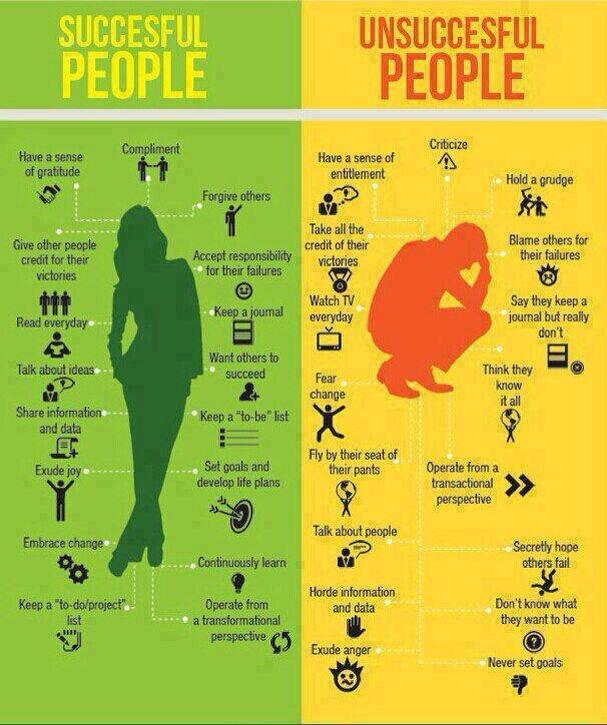
An infographic is a visual way to display data or to tell a story. It includes text, pictures, graphs, and sometimes videos.
Here is an example I like that I happened to find on a friend’s Facebook page recently. Click on the infographic to see a larger image.
Find inspiration for your topic on this website. Also try here. Or here.
You will need:
– Topic/idea for your infographic
– A plan for the content- what information, data, pictures, and even video you will want to use
Please let me know once you have an idea for a topic.
Once you have a topic, you will go to http://infogr.am/ and set up a free account using your email address.
Once you have created an account and are successfully logged in, select New Infographic. From there, choose a template to use for your infographic.
Follow your template to insert your own information. Along the right you will see icons that will allow you to add a chart, add a map, add text, add a picture, and add a video. Click on these icons to add your content.